

HCDZ Replacement Remote Control for KopBeau HC-01R NTH15-17BRA Swing Ceramic Tower Heater
Product details
| Management number | 247882648 | Release Date | 2026/08/16 | List Price | US$6.45 | Model Number | 247882648 | ||
|---|---|---|---|---|---|---|---|---|---|
| Category | |||||||||
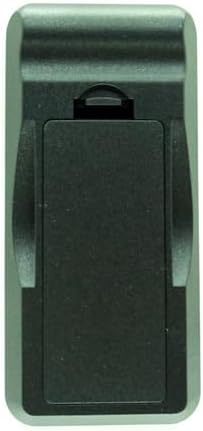
Product Setup and Usage Information This product is an infrared (IR) replacement remote control. The following information is provided to assist with setup and operation. 1. Product Overview and Compatibility This remote is a replacement accessory developed for use with specific ceramic tower heater models. For the remote to function, the heater must be connected to a power source and turned on at the unit itself. The remote typically cannot activate a heater that is in a complete “off” state at its physical controls. 2. Initial Setup Instructions Battery Installation: Open the battery compartment on the remote. Insert two AAA batteries. It is important to align the positive (+) and negative (-) ends according to the diagram inside the compartment. Using new batteries is recommended for optimal performance. Basic Operation: Ensure the heater is plugged in and turned on. Point the remote toward the front control panel of the heater where the infrared receiver is typically located. Maintain a clear line of sight between the remote and the heater, with a recommended distance under 20 feet. Press the buttons firmly and allow a moment for the signal to be received. 3. Troubleshooting Steps If the remote does not operate the heater, you may follow these steps: Step 1: Check Heater and Power Confirm the heater is plugged into an active outlet and that its main power switch or control is in the “on” position. A power indicator light on the heater is often a useful sign. Step 2: Check Remote Batteries Remove and reinstall the batteries, confirming the polarity is correct. You may try using a different set of new batteries. Step 3: Test the Remote’s Signal Many smartphone cameras can detect infrared light. You can point the front of the remote at your phone’s camera lens and press a button. If you observe a flickering light on your phone’s screen, it indicates the remote is emitting a signal. Step 4: Check for Obstructions or Interference Ensure no objects are blocking the path to the heater’s infrared receiver. Very bright ambient light (such as direct sunlight) can sometimes interfere with the signal. Step 5: Reset the System Unplug the heater from the electrical outlet for two minutes, then plug it back in and turn it on. This can reset the heater’s internal receiver. Remove the batteries from the remote for one minute, then reinstall them. 4. Notes on Specific Functions For the oscillation (swing) function, please refer to your heater’s original manual. Some models may require the heater to be set to a heat mode (not just a fan mode) for oscillation to be available. 5. How to Contact Seller for Support If you have followed the steps above and continue to experience issues, you may contact us for assistance via Amazon’s messaging system. To help us assist you effectively, please have your heater’s exact model number (usually found on a label on the product) and a description of the steps you have already taken available.
- Exact Replacement for Tower Heaters: This remote is designed as a direct, plug-and-play replacement for specific ceramic tower heater models with swing functions. It is not a universal remote.
- Complete Control for Heat & Oscillation: Regain full command over power, heat settings (Low/High), thermostat, timer, and the oscillation (swing) function, exactly like your original remote.
- Critical First-Time Setup Guide: Must Read: Before use, 1) Install new AAA batteries with correct polarity, 2) Ensure your heater is plugged in AND turned ON at the unit, 3) Point the remote directly at the heater's control panel.
- Step-by-Step Self-Diagnosis: If issues arise, follow our detailed guide: test the remote's signal with a phone camera, check for a clear line of sight, and perform a system reset by unplugging the heater for 2 minutes.
- Guaranteed Support for Setup: We are committed to making it work. If you encounter problems, contact us via Amazon Messages with your heater's model number. We provide personalized, step-by-step troubleshooting until resolved.
| ASIN | B0FZBPR426 |
|---|---|
| Brand | HCDZ |
| Color | Black |
| Manufacturer | HCDZ |
| Maximum Range | 6 meters |
| Number of Items | 1 |
| Compatible Devices | Fireplace |
| Additional Features | No Programming Required |
| Number of Batteries | 2 AAA batteries required. |
| Connectivity Technology | Infrared |
| Maximum Number of Supported Devices | 1 |

Bestseller ranking
Shampoos




Customers who viewed this product also viewed
Shoes





Correction of product information
If you notice any omissions or errors in the product information on this page, please use the correction request form below.
Correction Request Form